
Help
Plans & billing
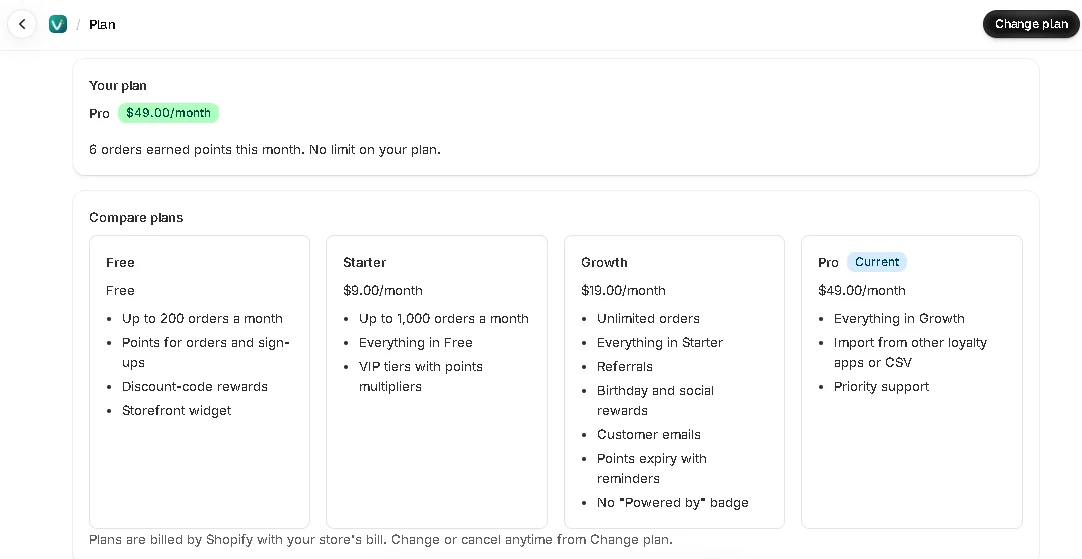
Start free and upgrade when you need more. Plans are billed by Shopify, on your store's Shopify bill.
Plans
| Setting | What it does |
|---|---|
| Free — $0 | Up to 200 orders a month earn points. Points for signups and orders, discount-code rewards, the storefront widget and customer account blocks. Also return on rewards (ROI) on the dashboard and points shown on the thank-you page. |
| Starter — $9/month | Up to 1,000 orders a month. Everything in Free, plus VIP tiers. |
| Growth — $19/month | Up to 3,000 orders a month. Everything in Starter, plus referrals, birthday and social rewards, customer emails, points expiry with reminders, and no "Powered by" line. Also bonus events (2x points days) and joining the program by customer tag. |
| Pro — $49/month | Up to 10,000 orders a month. Everything in Growth, plus member import from Smile.io, LoyaltyLion, Yotpo or a CSV, customer emails from your own domain, editable email texts, and priority support. |
| Plus — $99/month | Unlimited orders. Everything in Pro, plus the API and webhooks for mobile apps, headless stores and other apps. Also Shopify Flow triggers and actions. |
The monthly order limit
On every plan except Plus, a set number of orders earn points each month: 200 on Free, 1,000 on Starter, 3,000 on Growth and 10,000 on Pro. The count resets on the 1st. The Plan page shows how many you've used, and the dashboard warns you when you're close.
We also email you when 80% of the month's orders have been used and when the limit is reached. These emails always go out. To send them to another address, open Preferences in the app menu.
After the limit, new orders don't earn points until the 1st. Everything else keeps working: customers can still see their balance and redeem rewards.
Orders you exclude under Ways to earn → Orders that don't earn don't count toward the limit.
Early-bird stores
The first 100 stores to install get the Pro plan free, for good. That includes anything we add to Pro later; paid add-ons or plans above Pro, if we introduce them, aren’t part of it. If spots are left when you install, you can claim one in the welcome steps. An early-bird store keeps its spot if it uninstalls and comes back.
An early-bird store doesn't need a paid plan. If you choose one anyway under Change plan, Shopify bills for it and the Plan page shows it as your plan. To stop paying, choose Free there.
Setting up features before you upgrade
You can set up anything — tiers, referrals, emails — on any plan. Features your plan doesn't include are marked in the app, and customers won't see them until you upgrade.
Change or cancel
Go to Plan in the app menu and click Change plan. Shopify shows the plans and asks you to approve any charge. Uninstalling the app cancels a paid plan.